ASUS Artist1.0.20130411
Publisher Description
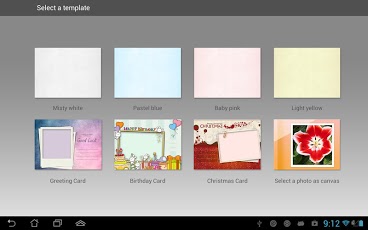
If you love painting, try this drawing app, ASUS Artist. It provides various painting tools including colored pencil, watercolor pencil, crayon, marker, and airbrush, allowing you to easily draw on painting boards of different background colors. You can also use the predefined card templates to easily create cards for your family and friends.Main features:- Provides painting boards of different colors.- Provides three card templates that allow you to easily create high quality photo cards.- Allows you to select a photo as a canvas and draw on the photo directly.- Provides various resizable painting tools including colored pencil, watercolor pencil, crayon, marker, and airbrush, which allows you to draw easily and freely.- Brings a rich colorful painting experience with its palette of 12 basic colors and user-defined palette for additional colors.- Allows you to add text, photos, and stickers to your paintings. The text color and size can be changed.- All your paintings are saved in MyWorks, which allows you to easily find a saved painting.*Note: If you experience any non APP related issues on your ASUS device, please contact ASUS technical support team at http://vip.asus.com/VIP2/Services/TechQuery
About ASUS Artist
The company that develops ASUS Artist is ASUS Computer Inc. The latest version released by its developer is 1.0.20130411. This app was rated by 7 users of our site and has an average rating of 4.5.
To install ASUS Artist on your Android device, just click the green Continue To App button above to start the installation process. The app is listed on our website since 2013-04-21 and was downloaded 1,310 times. We have already checked if the download link is safe, however for your own protection we recommend that you scan the downloaded app with your antivirus. Your antivirus may detect the ASUS Artist as malware as malware if the download link to com.asus.mydrawing is broken.
How to install ASUS Artist on your Android device:
- Click on the Continue To App button on our website. This will redirect you to Google Play.
- Once the ASUS Artist is shown in the Google Play listing of your Android device, you can start its download and installation. Tap on the Install button located below the search bar and to the right of the app icon.
- A pop-up window with the permissions required by ASUS Artist will be shown. Click on Accept to continue the process.
- ASUS Artist will be downloaded onto your device, displaying a progress. Once the download completes, the installation will start and you'll get a notification after the installation is finished.
Program Details
System requirements
Download information
Pricing
Version History
version 1.0.20130411
posted on 2013-04-21
version 1.0.20130411
posted on 2013-04-21
Several fixes and updates
